Customer Tag Management
Customer Tag Management Overview
Customer Tag Management is a feature that allows creating and assigning labels (tags/hashtags) to customers for:
- Classifying customers by behavior, value, or campaign
- Easy filtering and managing customer groups
- Supporting marketing, customer care, and analytics activities
Accessing the Tag Management Feature
To access the Customer Tag Management feature:
- From the left menu, select Customers
- Select Tag Management
- The system displays the Tag List screen
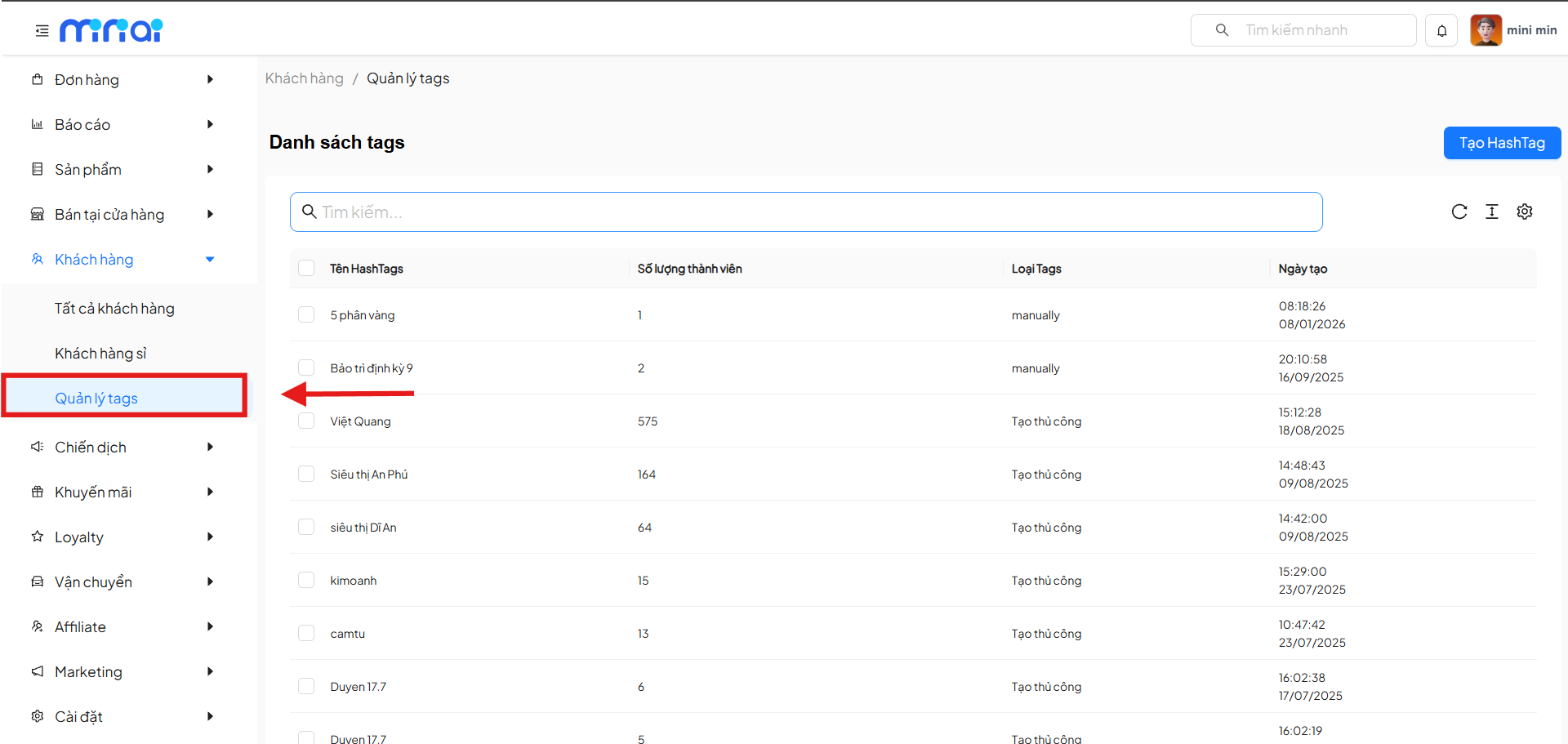
Tag List Screen
The Tag List screen displays all tags that have been created in the system.
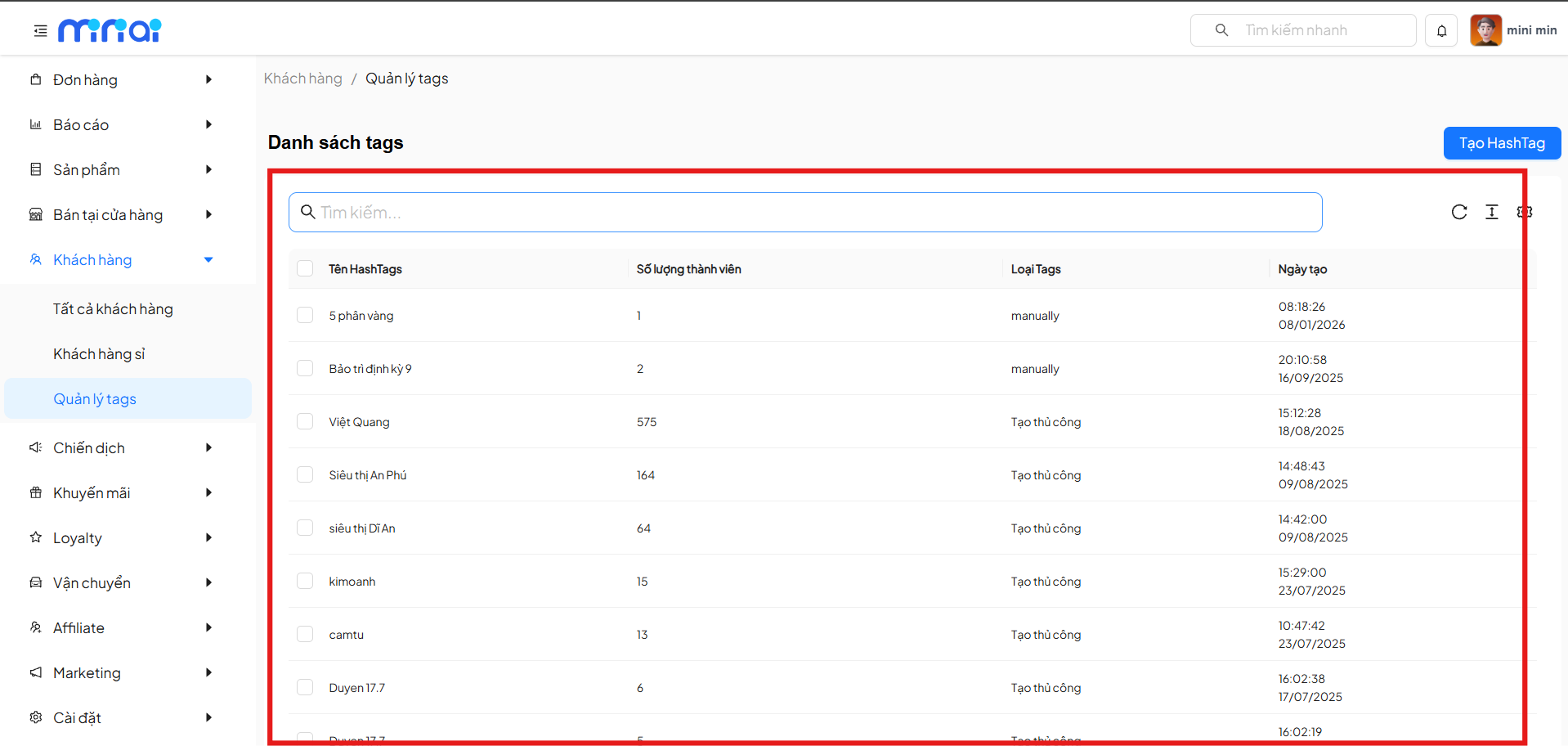
Main Components
| Component | Description |
|---|---|
| Search Bar | Allows quick tag search by hashtag name |
| Tag List | Displays all tags created in the system |
| Hashtag Name | Identifier name of the customer tag |
| Member Count | Number of customers currently assigned to the tag |
| Tag Type | Tag classification (manual / manually) |
| Created Date | Time when the tag was created in the system |
| Create HashTag Button | Used to create a new customer tag |
| Tag Selection Checkbox | Allows selecting one or multiple tags for quick actions |
Create a New Customer Tag
To create a new tag:
- On the Tag List screen, click Create HashTag
- The system displays the Create HashTag popup
- Enter the information:
- Hashtag Name (required)
- Hashtag Description (required)
- Click Select Customers for Tag to add customers
- Click Confirm to complete tag creation
The tag will appear in the tag list after creation.
View Customer Tag Details
Click on a tag in the list to view Hashtag Details.
Tag Detail Information
- Tag Name
- Description
- List of customers belonging to the tag
Allows editing tag information and updating data.
Customers in Tag Group
The Customers in Tag section displays the list of customers who have been assigned the tag.
Displayed Information Includes
- Hashtag Title
- Hashtag Description
- Orders Placed
- Amount Spent
- Remaining Task Points
- Total Points Earned
- Created Date
Add Customers to a Tag
To add customers to a tag:
- On the Hashtag Details page, click + Add Customer
- The system displays the Customers popup
- Search for customers by name or related information
- Can use quick filters (e.g., anonymous customers)
- Select one or multiple customers
- Click OK to add to the tag
Added customers will appear immediately in the tag's list.
Filter and Search Customers in a Tag
The customer selection popup supports:
- Quick search
- Filter by customer status
- Display assigned hashtags
- View referrer information
- View last update time
Helps manage the customer list accurately and efficiently.
Update Customer Tag
After editing information or changing the customer list:
- Click Update
- The system saves all changes
Benefits of Using Customer Tags
- Scientific customer classification
- Support for personalized care and marketing
- Easy customer data filtering and analysis
- Enhanced CRM management efficiency
- Good support for promotion and loyalty campaigns
Usage Notes
- Tag names should be concise and easy to understand
- Avoid creating too many tags with overlapping meanings
- Regularly review and update the customer list within tags
Conclusion
Customer Tag Management is an important tool that helps businesses organize and leverage customer data effectively. Proper use of tags will strongly support business operations, marketing, and customer care.
Last updated: 2026