Promotional Programs – Discount Code Management
Discount Code Overview
Discount Codes are promotional tools that allow businesses to create offers in the form of codes (vouchers/coupons) to:
- Attract new customers
- Drive faster purchases
- Increase order value
- Reward loyal customers
The system supports various types of discount codes, flexibly applicable to:
- Products
- Orders
- Shipping fees
- Buy-together programs (Buy X – Get/Discount Y)
Access Path
From the admin page, navigate to:
Promotions → Promotional Programs
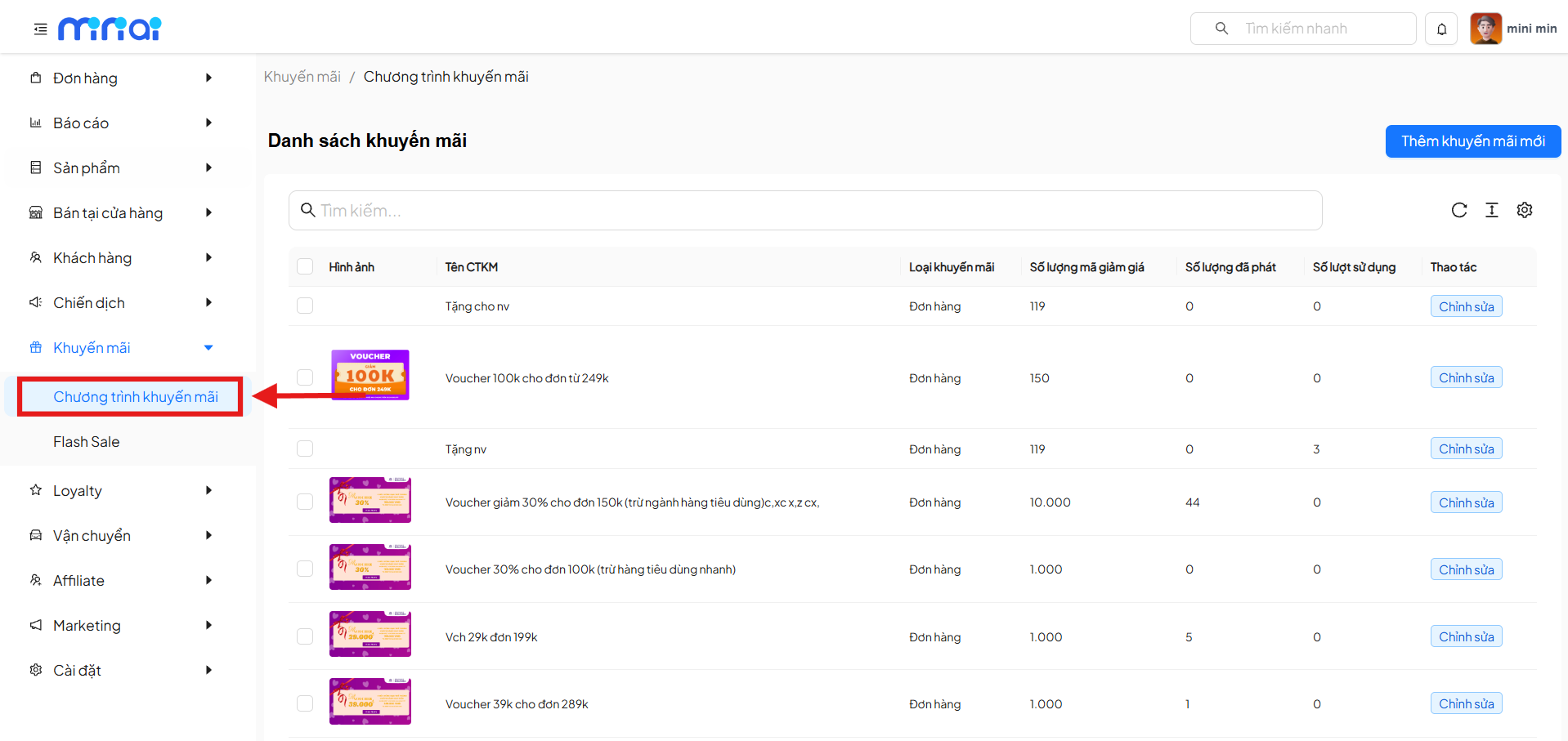
- View the complete list of discount codes
- Create new promotional programs
- Track code usage effectiveness
Discount Code Management Dashboard
The management dashboard displays a list of all promotional programs currently in the system.
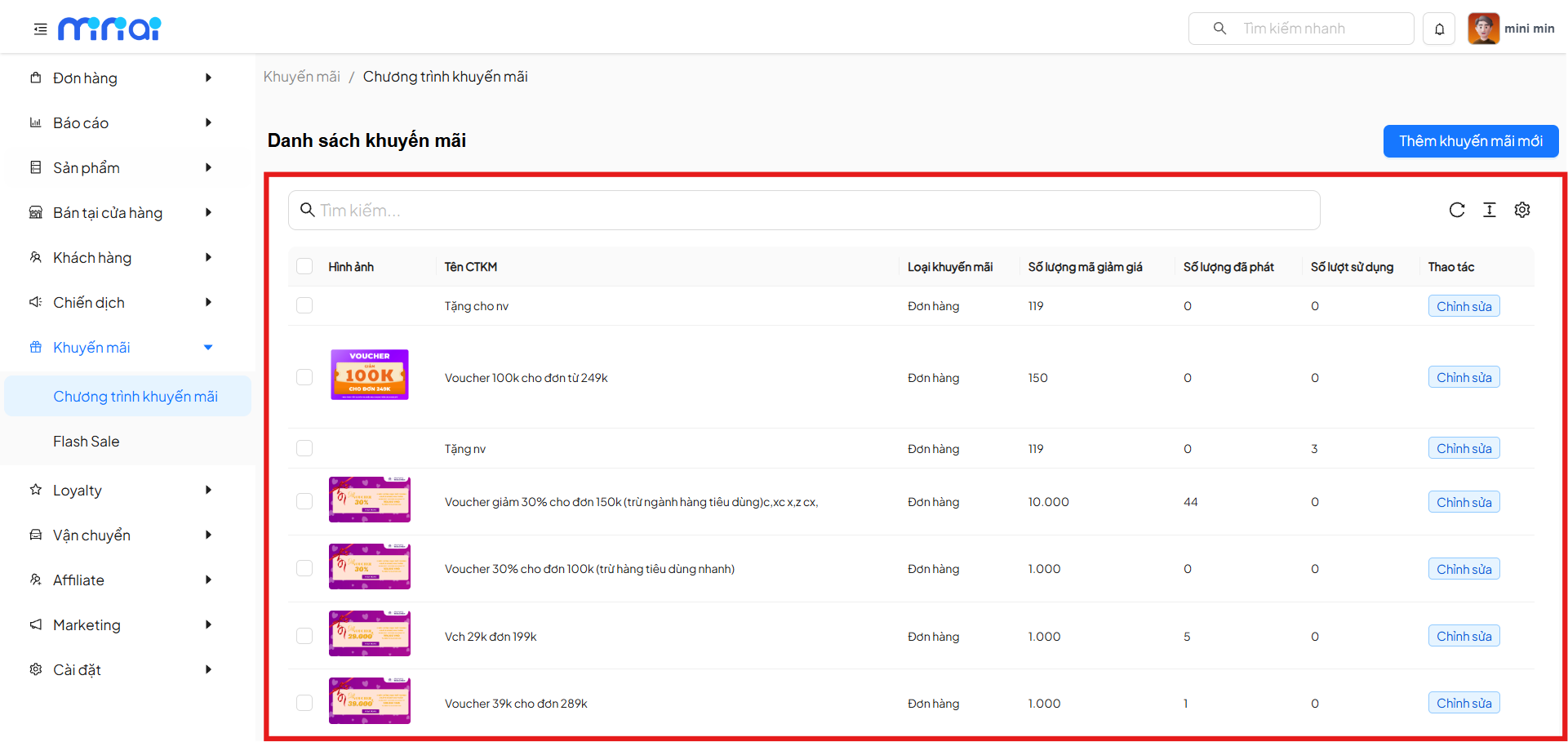
Key Features
| Feature | Description |
|---|---|
| Search | Search promotional programs by name |
| Add New Promotion | Create a new discount code program |
| List | Display all discount codes |
| Edit | Update program configuration |
| Statistics | Track number of issued & used codes |
Information Columns in the Table
| Column | Meaning |
|---|---|
| Image | Banner or thumbnail image of the discount code |
| Promotion Name | Name of the promotional program |
| Promotion Type | Application format (Product / Order / Shipping, etc.) |
| Discount Code Quantity | Total number of codes issued |
| Quantity Issued | Number of codes distributed to customers |
| Usage Count | Number of times codes were successfully used |
| Actions | Edit the program |
Create a New Promotional Program
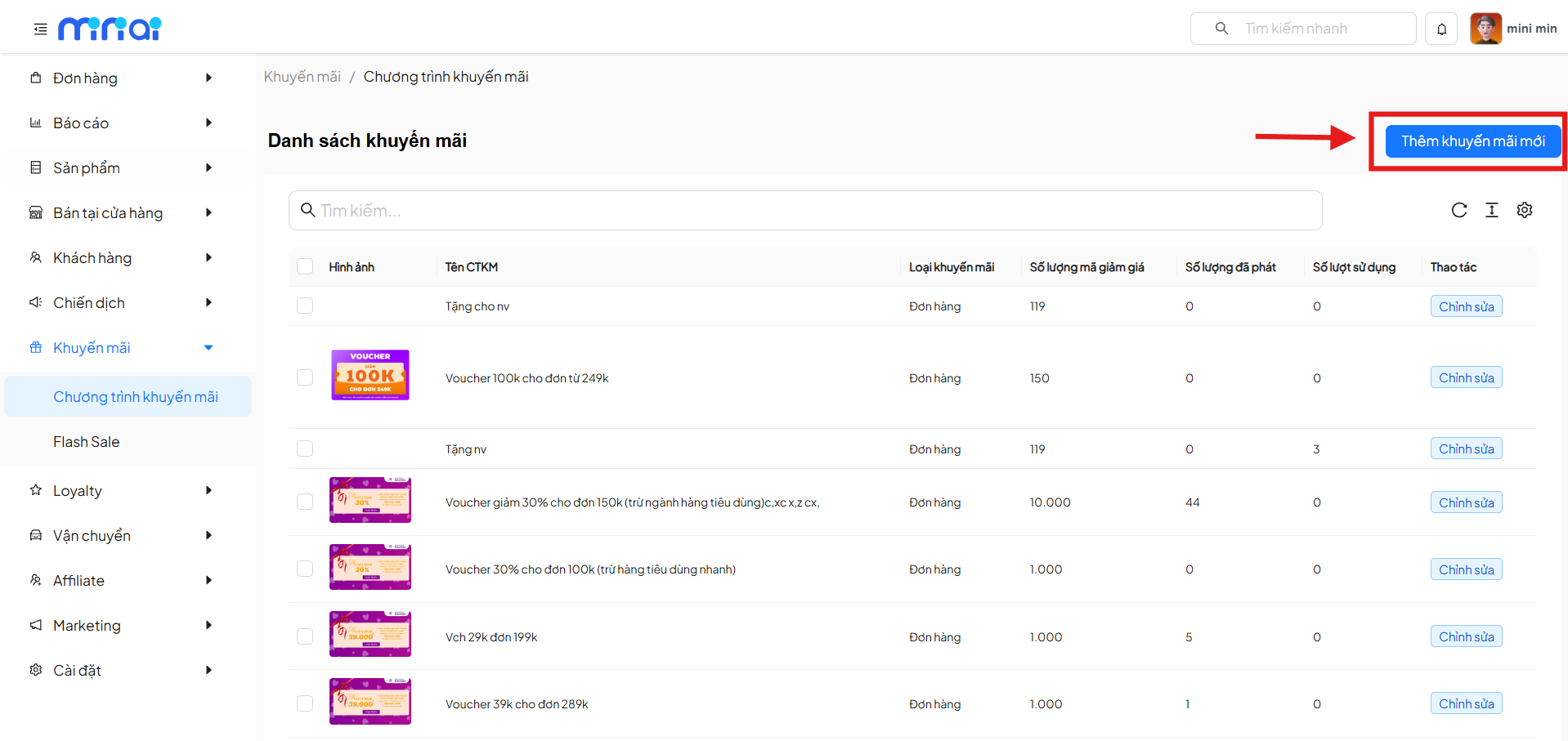
Click Add New Promotion, and the system will display a popup Select the type of promotion to create.
Here, the administrator selects the discount code type that fits the business needs.
Types of Discount Codes
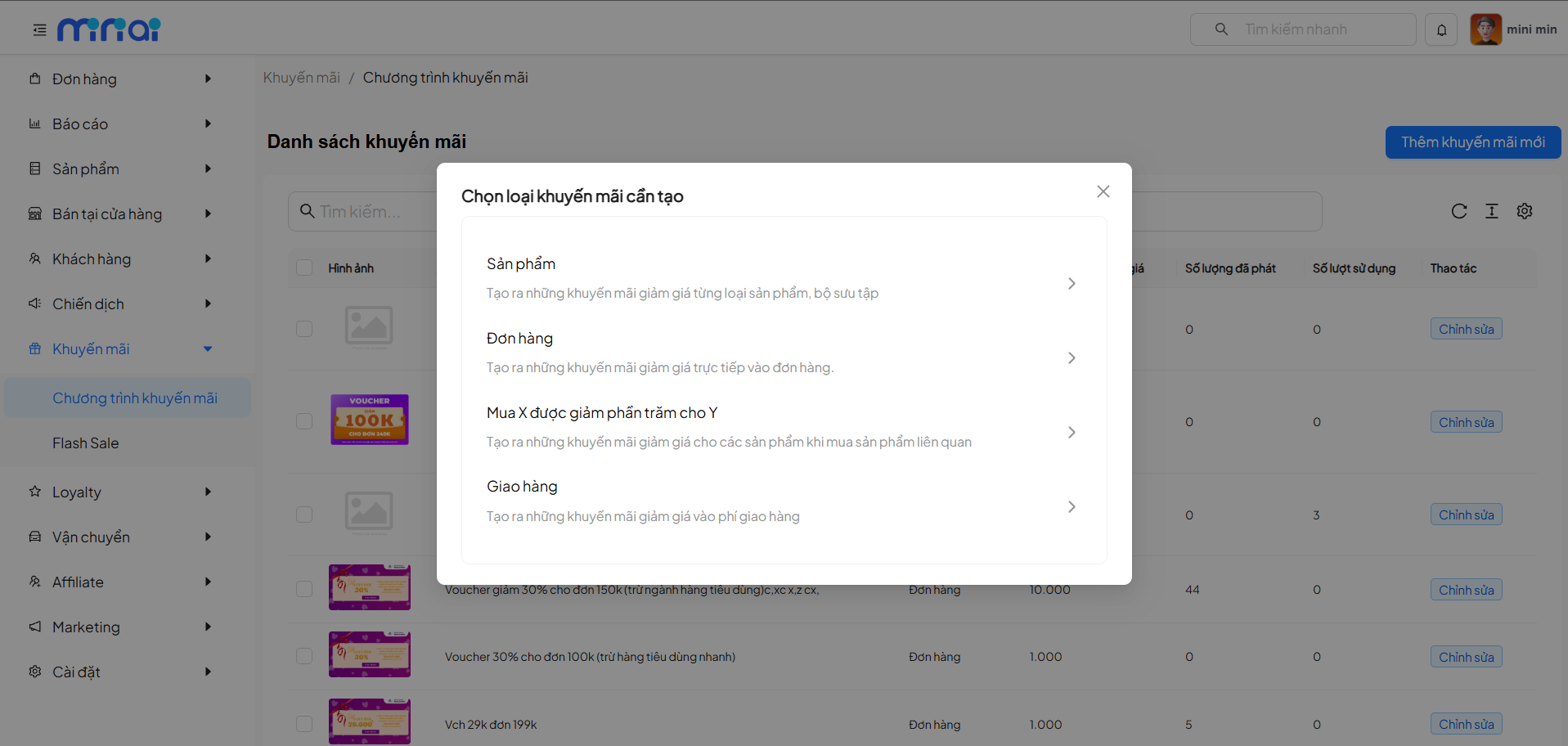
The system currently supports the following types of discount codes:
Product Discount Code
Applies discounts directly to:
- A single product
- Product groups
- Product collections
Suitable for programs:
- Inventory clearance
- New product launches
- Category-based promotions
Order Discount Code
Applies discounts on the total order value when conditions are met:
- Minimum order value
- Product quantity
Commonly used for:
- Stimulating higher order values
- Store-wide promotional programs
Shipping Discount Code
Directly reduces shipping fees for shoppers.
Suitable for:
- Free shipping campaigns
- Attracting orders from distant areas
Buy X Get Y Code
Applies programs:
- Buy product X → receive or get a discount on product Y
Commonly used for:
- Product bundling
- Increasing the number of products per order
Each type of discount code has its own specific settings and application conditions. Administrators need to select the type that matches the promotional objective.
Create Discount Code
Settings for Product and Order Promotion Codes
| Feature Group | Field / Feature | Detailed Description |
|---|---|---|
| Promotion Information | Promotion Name | Display name of the promotional program, helping administrators and customers easily identify the program |
| Promotion Description | Detailed description of the offer, conditions, and benefits of the program | |
| Voucher Code | Discount code for customers to enter at checkout (not required, must not duplicate existing codes) | |
| Image & Display | Image / Banner | Thumbnail image for the promotional program, used for display on Mini App or website |
| Discount Value | Discount Method | Choose between percentage (%) discount or fixed amount discount |
| Discount Amount | Specific value of the offer corresponding to the selected discount method | |
| Usage Limits | Usage Limit / User | Limit the number of times each customer can use the promotion code |
| Maximum Total Usage | Total number of times the promotion code can be used system-wide | |
| Application Conditions | Minimum Order Value | Minimum order value condition for the promotion code to be valid |
| Application Scope | Applicable Products | Select products, categories, or collections eligible for the promotion |
| Target Audience | Promotion Recipients | Define the customer group eligible: all, by group, or specific customers |
| Usage Method | Code Usage Method | Choose auto-apply or require customer to enter promotion code |
| Display | Display on Mini App | Decide whether to display the promotion on Mini App for customers |
| Time Period | Promotion Start Time | Start date and time of the promotional program |
| Promotion End Time | End date and time of the promotional program |
Table of features required to configure the promotional program
Settings for Shipping and Buy X Get Y Promotion Codes
| Feature Group | Field / Feature | Detailed Description |
|---|---|---|
| Promotion Information | Promotion Name | Display name of the Buy X Get Y promotional program, helping administrators and customers easily identify the program |
| Promotion Description | Detailed description of the Buy X – Get Y mechanism, application conditions, and customer benefits | |
| Voucher Code | Promotion code for customers to enter at checkout (not required, must not duplicate existing codes) | |
| Image & Display | Image / Banner | Thumbnail image for the Buy X Get Y program, used for display on Mini App or website |
| Discount Value | Offer Method | Define the promotional format based on the mechanism of buying product X to receive or get a discount on product Y |
| Offer Value | Quantity of product Y given or discount level applied to product Y | |
| Usage Limits | Usage Limit / User | Limit the number of times each customer can use the Buy X Get Y promotion |
| Maximum Total Usage | Total number of times the Buy X Get Y promotion can be used system-wide | |
| Application Conditions | Minimum Order Value | Minimum order value required to activate the Buy X Get Y promotion |
| Application Scope | Products / Categories / Collections to Buy | Define the products, categories, or collections that customers must buy (product X) to qualify for the promotion |
| Discounted / Free Products | Define the products that are discounted or given as gifts (product Y) when the customer meets the conditions | |
| Promotion Rules | Recursive Promotion | Allow or disallow the Buy X Get Y promotion to be applied multiple times within the same order |
| Target Audience | Promotion Recipients | Define the customer group eligible for the promotion: all customers, by group, or specific customers |
| Usage Method | Promotion Usage Method | Choose auto-apply when conditions are met or require customer to enter the promotion code |
| Display | Display on Mini App | Decide whether to display the Buy X Get Y promotion on Mini App for customers |
| Time Period | Promotion Start Time | Start date and time of the promotional program |
| Promotion End Time | End date and time of the promotional program |
Table of features required to configure the Buy X Get Y promotional program
Settings for Free Shipping Codes
| Feature Group | Field / Feature | Detailed Description |
|---|---|---|
| Promotion Information | Promotion Name | Display name of the Free Ship promotional program, helping administrators and customers easily identify the program |
| Promotion Description | Detailed description of the free or supported shipping policy and application conditions | |
| Voucher Code | Promotion code for customers to enter at checkout (not required, must not duplicate existing codes) | |
| Image & Display | Image / Banner | Thumbnail image for the Free Ship program, used for display on Mini App or website |
| Usage Method | Promotion Usage Method | Choose auto-apply when conditions are met or require customer to enter the Free Ship code |
| Usage Limits | Usage Limit / User | Limit the number of times each customer can use the Free Ship promotion |
| Maximum Total Usage | Total number of times Free Ship can be used system-wide | |
| Application Conditions | Minimum Order Value | Minimum order value required to qualify for the Free Ship promotion |
| Discount Value | Shipping Support Method | Define whether to waive the entire shipping fee or support a portion of the shipping fee |
| Support Amount | Maximum amount supported for shipping fees per order | |
| Application Scope | Delivery Area | Define the areas or shipping methods eligible for Free Ship |
| Target Audience | Promotion Recipients | Define the customer group eligible for Free Ship: all customers, by group, or specific customers |
| Display | Display on Mini App | Decide whether to display the Free Ship promotion on Mini App for customers |
| Time Period | Promotion Start Time | Start date and time of the Free Ship program |
| Promotion End Time | End date and time of the Free Ship program |
Table of features required to configure the Free Ship promotional program
Conclusion
The Discount Code feature is an effective tool that helps businesses:
- Attract new customers and retain existing ones
- Drive fast purchasing behavior and increase order value
- Create flexible and diverse promotional campaigns